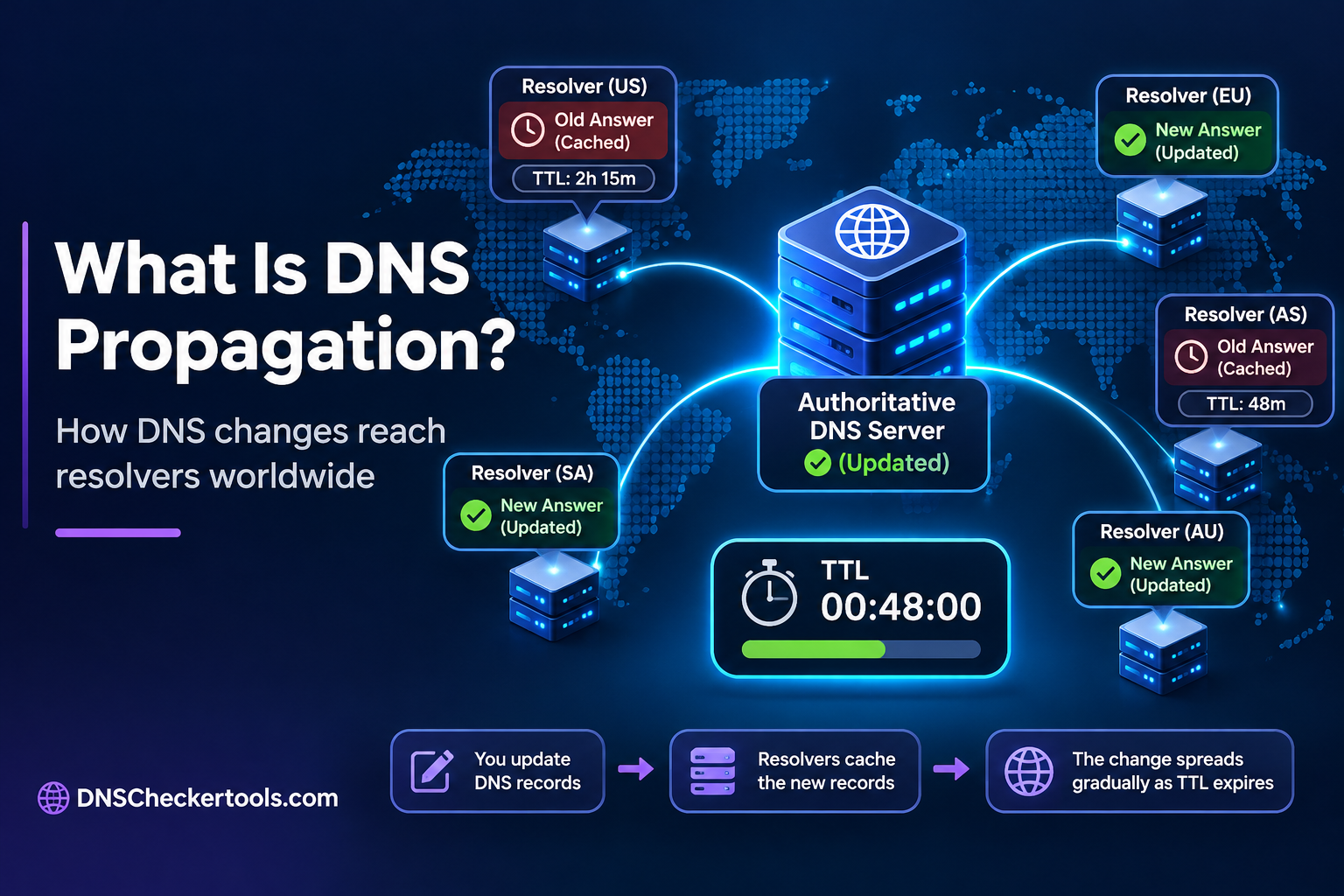
DNS propagation is the process through which changes to a domain’s DNS records become visible to recursive DNS resolvers across different networks and locations.
When you update a DNS record, such as an A, AAAA, CNAME, or MX record, the change does not necessarily appear everywhere immediately. Some DNS resolvers may continue using previously cached information until their cache expires or they refresh the record.
This process is commonly called DNS propagation. It explains why a website may load using its old IP address for some visitors while others can already access it through the new address.
DNS propagation is particularly important when changing website hosting providers, updating nameservers, modifying DNS records, or configuring email services.
How Does DNS Propagation Work?
DNS propagation is closely related to how authoritative DNS servers and recursive DNS resolvers handle domain information.
It is important to understand that DNS propagation is not a process in which all DNS servers communicate with each other to distribute updated records. Instead, updated information becomes visible as DNS providers publish changes and recursive resolvers refresh their cached responses.
The process generally involves the following stages.
1. DNS Records Are Updated
The process begins when a domain owner changes a DNS record through their DNS hosting provider.
For example, suppose a website moves to a new hosting server:
Previous IP address:
192.0.2.10New IP address:
192.0.2.25Updated record: A record
The DNS administrator replaces the old IP address with the new one in the domain’s DNS configuration.
These are illustrative IP addresses reserved for documentation.
2. Authoritative DNS Servers Provide Updated Information
Authoritative DNS servers store the official DNS records for a domain.
When a DNS record is updated, the DNS provider makes the change available through its authoritative infrastructure. The timing can depend on the provider’s configuration and how it distributes DNS zone updates across its servers.
These servers provide authoritative answers for the domain.
3. Recursive DNS Resolvers May Continue Using Cached Records
When someone visits a website, their device usually sends a DNS query to a recursive DNS resolver.
This resolver may be operated by:
An internet service provider (ISP).
Google Public DNS.
Cloudflare DNS.
Another public or private DNS service.
If the resolver already has the old DNS record in its cache, it may continue returning that information until the cached entry expires.
It does not necessarily request the updated record immediately.
4. Resolvers Refresh Their DNS Information
After a cached record expires, the recursive resolver can request updated information from the authoritative DNS infrastructure.
It then caches the new response according to its TTL.
As different resolvers refresh their cached information at different times, users gradually begin receiving the updated DNS records.
This is why DNS changes may appear at different times across networks and locations.
How Long Does DNS Propagation Take?
DNS propagation does not have a fixed completion time.
A DNS change may become visible to some resolvers within minutes, while others may continue returning older information for longer.
The actual timeframe depends on several factors, including:
Previous DNS record TTL values.
DNS resolver caching policies.
Authoritative DNS provider infrastructure.
Nameserver delegation changes.
Negative DNS caching.
Network and resolver configurations.
The commonly mentioned 24–48-hour or 72-hour propagation period is a general planning estimate, not a technical guarantee or universal DNS rule.
Factors That Affect DNS Propagation Time
| Factor | How It Affects Propagation |
|---|---|
| DNS TTL | Determines the normal period for which resolvers may reuse cached records. |
| DNS resolver cache | Different resolvers refresh their cached information at different times. |
| Nameserver delegation | Cached delegation information can affect when resolvers discover new authoritative nameservers. |
| DNS provider | Provider infrastructure and configuration affect when updated records become available. |
| Negative caching | Previously cached NXDOMAIN or NODATA responses can delay the visibility of newly created records. |
How Does DNS TTL Affect Propagation?
TTL stands for Time to Live. It specifies how long a DNS record can remain in a resolver’s cache before it should be refreshed.
TTL values are usually measured in seconds.
For example:
| DNS TTL | Equivalent Time |
|---|---|
| 300 seconds | 5 minutes |
| 1,800 seconds | 30 minutes |
| 3,600 seconds | 1 hour |
| 14,400 seconds | 4 hours |
| 86,400 seconds | 24 hours |
Suppose an A record has a TTL of 14,400 seconds.
If a resolver cached the old IP address immediately before the record was changed, it may continue using that cached answer for up to four hours under normal TTL behavior.
Once the cache entry expires, the resolver can retrieve the updated record.
Important: Lowering the TTL after changing a record does not shorten the lifetime of an old answer that a resolver has already cached.
If you are planning a migration, reduce the TTL sufficiently in advance, allow the previous TTL period to expire, and then make the DNS change.
TTL provides a normal caching period, but it does not establish a universal deadline for DNS propagation. Resolver policies and infrastructure can also affect the results.
DNS Propagation vs. DNS Caching: What’s the Difference?
DNS propagation and DNS caching are closely connected, but they are not the same thing.
DNS propagation describes the period during which DNS changes become visible through different resolvers. DNS caching is the mechanism that allows resolvers to temporarily store DNS responses and reuse them.
| Comparison | DNS Propagation | DNS Caching |
|---|---|---|
| Meaning | Visibility of DNS changes across resolvers | Temporary storage of DNS responses |
| Main purpose | Describes the effect of DNS updates | Reduces repeated DNS queries |
| Related mechanism | Resolver refresh and DNS delegation | TTL and cache expiration |
| Effect of updates | Different resolvers may return different answers | Old answers may remain available until expiration |
For example, when a website changes its hosting IP address, its authoritative DNS server may already return the new address. However, a recursive resolver that has cached the previous address may continue returning it until the cache expires.
This explains why a DNS update can be successful even when some users still experience the old configuration.
How Does DNS Propagation Work After Changing Nameservers?
Changing nameservers is different from updating an individual DNS record.
When you change a domain’s nameservers, you are changing the authoritative DNS servers responsible for answering queries about that domain.
This process involves DNS delegation, which connects a domain to its authoritative nameservers through the parent DNS zone.
For example, suppose a domain currently uses:
Old nameservers:
ns1.oldprovider.comandns2.oldprovider.comNew nameservers:
ns1.newprovider.comandns2.newprovider.com
After updating the nameservers at the domain registrar:
The registrar processes the nameserver change.
The parent DNS zone publishes the updated delegation information.
Recursive resolvers may continue using previously cached delegation information.
Resolvers refresh their cached information and discover the new authoritative nameservers.
DNS queries are directed to the new DNS infrastructure.
The transition can take longer than an ordinary record update because nameserver delegation has its own caching considerations.
Important: Before changing nameservers, make sure the new DNS provider has all the necessary records configured. Missing A, AAAA, MX, TXT, or other required records can affect website access, email delivery, and domain services.
How to Check DNS Propagation Across Resolvers
You can check DNS propagation by comparing DNS responses from different recursive resolvers and checking the authoritative DNS servers directly.
This helps determine whether the updated record is available and whether some resolvers are still returning cached information.
Method 1: Use an Online DNS Propagation Checker
An online DNS propagation checker can help compare DNS responses from multiple available resolvers.
A typical checking process involves:
Enter your domain name.
Select the DNS record type you want to check, such as A, AAAA, MX, or NS.
Run the lookup.
Compare the returned DNS values.
Identify whether different resolvers are returning different results.
For example, if you recently changed your domain’s A record, compare the returned IP addresses.
If a resolver returns the old IP address, it may still have cached information.
If a resolver returns the new IP address, it is providing the updated answer.
If a resolver returns an error, investigate whether the record, delegation, or DNS resolution process is configured correctly.
Remember that a propagation checker only shows responses from the resolvers it queries. It cannot prove that every DNS resolver worldwide has updated its information.
Method 2: Check DNS Records Using the dig Command
The dig command is commonly used on Linux and macOS systems. It is also available on Windows when the appropriate DNS utilities are installed.
To check an A record, run:
dig example.com ATo query a particular recursive DNS resolver, use:
dig @1.1.1.1 example.com AYou can also compare the response from Google’s public DNS resolver:
dig @8.8.8.8 example.com AReplace example.com with your actual domain.
If the results differ, the resolvers may have different cached answers or be using different DNS resolution paths.
Method 3: Query the Authoritative DNS Server Directly
To determine whether the updated record is available from the authoritative DNS infrastructure, query an authoritative nameserver directly.
For example:
dig @ns1.example-dns.com example.com AHere, ns1.example-dns.com is an illustrative authoritative nameserver.
This query requests the record directly from the specified server rather than relying on a recursive resolver’s cache.
If the authoritative server returns the new IP address but a recursive resolver returns the old one, caching is a likely explanation.
However, querying one authoritative server does not necessarily verify every authoritative server operated by the DNS provider. You should compare the responses from the domain’s authoritative nameservers when investigating inconsistencies.
For nameserver delegation changes, you can also use:
dig +trace example.com NSThis follows the DNS delegation path and helps identify which nameservers the parent zones publish.
Understanding Different DNS Checking Methods
| Checking Method | What It Tells You |
|---|---|
| Recursive DNS lookup | What a particular resolver currently returns |
| Authoritative DNS lookup | What the specified authoritative server currently returns |
| DNS trace | How DNS delegation is followed through the hierarchy |
Common DNS Propagation Issues and Their Causes
Sometimes DNS changes do not appear as expected. This does not always mean the DNS update has failed.
The following situations can explain common propagation issues.
1. Website Still Shows the Old IP Address
Possible cause: A recursive resolver still has the previous A or AAAA record cached.
What to do:
Check the record’s previous TTL.
Compare results from different recursive resolvers.
Query the authoritative nameservers directly.
Wait for the relevant cached entry to expire.
2. Newly Created DNS Record Returns NXDOMAIN or NODATA
Possible cause: A resolver may have cached a negative DNS response.
Two common negative responses are:
NXDOMAIN: Indicates that the queried domain name does not exist.
NODATA: Indicates that the domain exists, but the requested record type is unavailable.
These responses can be cached under negative DNS caching rules. Their caching period is calculated using information from the domain’s SOA record.
What to do:
Verify that the new DNS record exists.
Check the authoritative DNS response.
Inspect the SOA information and negative-cache TTL.
Allow the cached negative response to expire.
Lowering the TTL of the newly created record will not necessarily remove an existing negative cache entry.
3. Website Is Not Accessible After Changing Nameservers
Possible cause: The new DNS provider may not have all the required DNS records configured, or the domain delegation may still point to the previous nameservers.
What to do:
Verify the nameservers configured at your registrar.
Check the delegation published by the parent DNS zone.
Confirm that the new DNS zone contains the required records.
Check for DNSSEC configuration problems if the domain uses DNSSEC.
4. Different Authoritative Nameservers Return Different Records
Possible cause: The authoritative DNS servers may not have consistent zone data, or the domain may have incorrectly configured authoritative servers.
What to do:
Query each authoritative nameserver separately.
Compare their responses.
Check the zone configuration with your DNS provider.
Verify that the nameservers are correctly configured.
This issue is different from ordinary recursive DNS caching because the authoritative servers themselves may be returning inconsistent information.
5. Email Is Not Working After DNS Changes
Possible cause: MX records or related email authentication records may be missing or incorrectly configured.
What to do:
Verify the domain’s MX records.
Check the relevant SPF, DKIM, and DMARC configuration.
Confirm that the MX records point to the correct mail servers.
Check whether the authoritative DNS servers return the expected values.
Avoid deleting old email-related records until the new configuration has been verified.
DNS Propagation Best Practices
Following a few practical precautions can reduce disruption when changing DNS configurations.
Check existing TTL values: Understand how long resolvers may have cached the previous records.
Lower TTL before planned migrations: Reduce TTL sufficiently in advance and allow the previous TTL period to pass.
Verify DNS records before switching: Make sure the new DNS configuration contains all necessary records.
Keep old hosting services available: Avoid shutting down the previous server immediately after changing DNS records.
Monitor important DNS records: Check A, AAAA, MX, NS, and other relevant records after making changes.
Verify nameserver delegation: Confirm that the parent DNS zone publishes the intended nameservers.
Check DNSSEC when applicable: Make sure DS records and DNSSEC configuration remain consistent during provider changes.
These precautions are particularly important for business websites, online stores, and email services where DNS mistakes can interrupt important operations.
Frequently Asked Questions About DNS Propagation
1. What is DNS propagation in simple terms?
DNS propagation is the process through which DNS changes become visible to recursive DNS resolvers. After updating a DNS record, some resolvers may continue returning the previous information until their cached records expire.
2. Why does DNS propagation take time?
DNS propagation takes time mainly because recursive DNS resolvers cache DNS responses. Different resolvers may have cached previous records at different times and therefore refresh their information at different times.
3. Can I speed up DNS propagation?
You can reduce delays by lowering DNS TTL values before a planned change, allowing the previous TTL period to expire, and ensuring the new DNS configuration is correct. However, you cannot force every external resolver to refresh its cache immediately.
4. Does DNS propagation affect website availability?
Yes. If DNS records are incorrectly configured or some resolvers continue returning an outdated IP address, visitors may experience inconsistent website access. Incorrect MX records can also affect email delivery.
5. How can I tell if DNS propagation is complete?
Compare DNS responses from multiple recursive resolvers and check the authoritative nameservers directly. Consistent updated responses provide a good indication that the change is widely visible, although no limited set of checks can guarantee that every resolver worldwide has refreshed its information.
Conclusion
DNS propagation is an important part of managing domain names and DNS configurations. It explains why changes to DNS records may not become visible to all users immediately.
Understanding DNS caching, TTL values, authoritative nameservers, and recursive resolvers helps website owners identify delays and avoid unnecessary configuration changes.
Before switching hosting providers, updating nameservers, or modifying DNS records, verify the new configuration and monitor the returned DNS responses.
For more practical DNS information and domain diagnostics, explore the resources available at DNSCheckerTools.com to better understand and investigate DNS-related issues.
SEO Metadata
SEO Title: What Is DNS Propagation? How It Works and How to Check
Meta Description: Learn what DNS propagation is, how it works, how long it takes, and how to check DNS changes across resolvers.
Suggested URL Slug: what-is-dns-propagation
Primary Keyword: DNS propagation
Secondary Keywords:
What is DNS propagation
DNS propagation time
How DNS propagation works
DNS propagation checker
How to check DNS propagation
DNS propagation process
DNS propagation issues
How long does DNS propagation take
Semantic and Contextual Keywords:
DNS records
DNS caching
DNS TTL
Recursive DNS resolver
Authoritative nameserver
DNS lookup
Nameserver propagation
DNS delegation
DNS resolution
Negative DNS caching
NXDOMAIN
NODATA
SOA record
Parent DNS zone
DNS cache expiration
WordPress Tags:
DNS Propagation, DNS Caching, DNS TTL, DNS Records, DNS Lookup, DNS Resolution, DNS Delegation, DNS Troubleshooting, Recursive DNS Resolver, Authoritative Nameserver,
Suggested Parent Category: DNS Fundamentals
Internal Linking Suggestions
| Suggested Anchor Text | Destination Topic |
|---|---|
| What Is DNS and How Does It Work? | DNS fundamentals pillar |
| How DNS Records Work | DNS records pillar |
| What Is a DNS TTL and How Does It Work? | DNS TTL supporting article |
| How to Check DNS Records of a Domain | DNS lookup tutorial |
| What Happens When DNS Records Are Changed? | DNS changes supporting article |
Use the actual published destination URLs when implementing these internal links. Do not create links to unverified pages.